|
|
马上注册,结交更多好友,享用更多功能,让你轻松玩转社区。
您需要 登录 才可以下载或查看,没有账号?注册

×
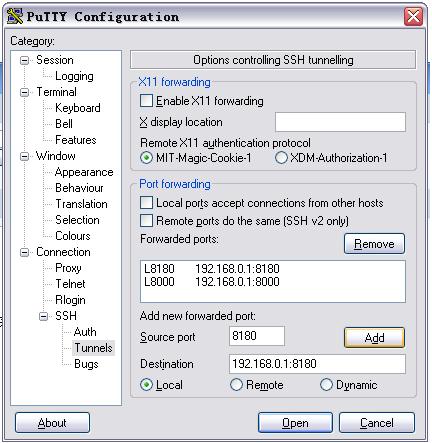
论坛上有些专家谈到了用SSH隧道以web方式管理COYOTE的问题,但是英文的说明看不明白,能否再说的详细些呢,一定有很多朋友想知道,毕竟LINUX的命令太陌生了。以下这些说明是否可以翻译一下给个说明,另外是不是它实现的仍然只是在内网中输入外网IP和端口才可以实现WEB管理呢?还是你即便是人在外网同样也可以用PTTUY的SSH隧道实现WEB管理呢。“通常 Coyote 的 Web 管理只能在内网实现,外网只能通过 SSH 连接 Coyote 路由器,要在外网连接 Coyote 的 Web 管理可以通过 SSH 隧道,原文如下:Using the SSH Tunnel to access the Coyote Web Administrator Imagine you want to access the Coyote Web Administrator from internet and your internal Coyote IP number is 192.168.0.1- Run putty - Go to Connection --> SSH --> Tunnels- At Source Port put 8180, at Destination put 192.168.0.1:8180, click Add.- Make your login at coyote (Follow the instructions above).- While putty is running the tunnel will stay open as port 8180 in your local computer.- Minimize putty.- Open your favorite browser. Type: http://localhost:8180 or http://127.0.0.1:8180.- After finish using the tunnel, logout Coyote and close putty.” |
|
 |Archiver|手机版|小黑屋|软路由
( 渝ICP备15001194号-1|
|Archiver|手机版|小黑屋|软路由
( 渝ICP备15001194号-1| 渝公网安备 50011602500124号 )

 IP卡
IP卡 狗仔卡
狗仔卡
 发表于 2005-2-24 22:31:57
 提升卡
提升卡 置顶卡
置顶卡 沉默卡
沉默卡 喧嚣卡
喧嚣卡 变色卡
变色卡 显身卡
显身卡